
Caching Patterns : Read Through
Introduction
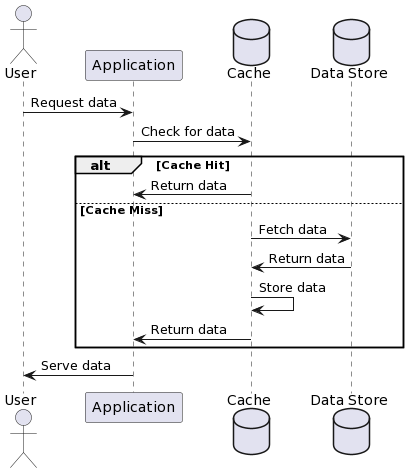
Effective caching strategies are vital for high-performance applications. While data fetching from the data store is performed by the client application on lazy loading, with the read through pattern the client application only interacts with the caching layer. Indeed the caching layer is reponsible for calling the data store in case of cache miss.
Mechanics of Read Through
Sequence diagram
Steps
Here is a breakdown of the steps involved in read through :
- User Request: A request is made for data by the client application.
- Cache Lookup: The application queries the cache first.
- Cache Hit: If data is present (cache hit), it’s returned immediately to the client.
- Cache Miss: If the data isn’t in the cache (cache miss), the cache layer itself automatically fetches the data from the primary store.
- Data Caching: Once retrieved, the data is stored in the cache for future access.
- Serving Data: The data is returned to the client, now stored in the cache for quicker subsequent retrieval.
Implementation
In this example, the cache server abstracts the interaction with the data store and the cache from the client application.
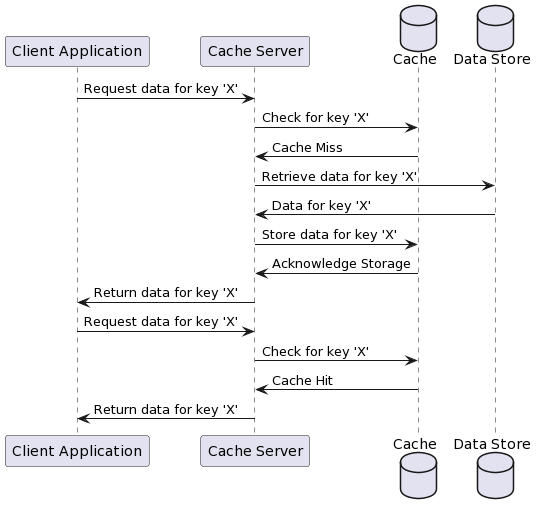
Here’s a Node.js implementation of the cache server:
const express = require('express');

const app = express();
const port = 3000;

// Simulated data store
const dataStore = {
  '1': { id: 1, name: 'Item 1' },
  '2': { id: 2, name: 'Item 2' },
  // ... other items
};

// Simulated cache
let cache = {};

// Middleware to simulate read-through cache behavior
function readThroughCache(req, res, next) {
  const { id } = req.params;
  if (cache[id]) {
    console.log('Returning from cache');
    res.send(cache[id]);
  } else {
    console.log('Cache miss, loading from data store');
    const item = dataStore[id];
    if (item) {
      cache[id] = item; // Add to cache
      res.send(item);
    } else {
      res.status(404).send('Item not found');
    }
  }
}

app.get('/data/:id', readThroughCache);

app.listen(port, () => {
  console.log(`Server running on port ${port}`);
});
Here is the client application code that consumes the abstraction provided by the cache server.
const http = require('http');

// Function to get data by ID from the server
function getDataById(id) {
  http.get(`http://localhost:3000/data/${id}`, (res) => {
    let data = '';

    res.on('data', (chunk) => {
      data += chunk;
    });

    res.on('end', () => {
      if (res.statusCode === 200) {
        console.log('Data retrieved:', data);
      } else {
        console.log('Error:', res.statusCode, data);
      }
    });

  }).on('error', (e) => {
    console.error(`Got error: ${e.message}`);
  });
}

// Example usage
getDataById('1'); // Should retrieve the item with ID '1'
Read Through on AWS
Before discussing read through on AWS let’s view in more details DAX, and DynamoDB.
DynamoDB
Amazon DynamoDB is a fully managed NoSQL database service provided by Amazon Web Services (AWS)
DAX
Amazon DynamoDB Accelerator (DAX) is an in-memory caching service for DynamoDB
Read through pattern
The client application interacts only with DAX. It does not query DynamoDB directly. In case of cache miss, DAX is responsible for fetching the data from the dynamoDB and returning the data to the client application.
The following diagram illustrates the interaction between the client application, DAX, and DynamoDB:
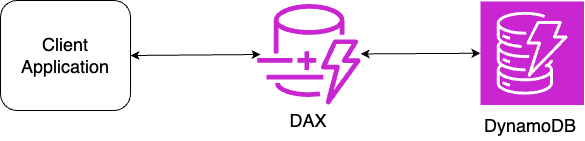
Note that CDNs like Cloudfront operate using a read-through pattern as well.
Conclusion
Read-through caching enhances application performance by automatically loading and refreshing cache entries on demand. It abstracts the complexity of direct data store access from the client applications.