
Caching Patterns : Lazy loading
Introduction
Performance optimization is a critical aspect of software development. As applications grow in complexity and data volume, maintaining speed and efficiency becomes a challenge. One of the most effective ways to optimize performance is through intelligent data management, with caching being a cornerstone of this approach.
Among various caching strategies, lazy loading stands out for its on-demand data loading approach. Unlike strategies that load large quantities of data upfront, lazy loading defers this process until the data is actually needed. This can significantly reduce initial load time and utilize system resources more effectively.
Use Cases
The following are examples for which lazy loading is a good fit :
- Web applications that load images or content as the user scrolls, often seen in image-heavy sites like online galleries or social media platforms.
- Mobile applications where conserving data and reducing memory usage is critical for performance, especially on devices with limited resources.
- Large-scale enterprise applications that work with extensive datasets, where loading all the data at once would be impractical and inefficient.
Mechanics of Lazy Loading
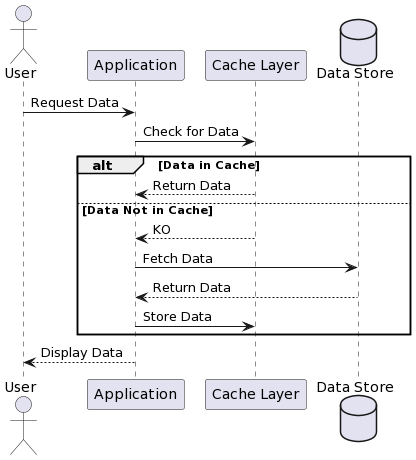
Sequence diagram
Steps
Here is a breakdown of the steps involved in Lazy loading :
- User Request: When a user interacts with an application and requests data
- Cache Check: The application first checks the cache to see if the requested data is available. This step is crucial because it can significantly speed up data retrieval compared to fetching it from a remote data store.
- Cache Miss and Data Fetching: If the data is not found in the cache (a cache miss), the application will then proceed to load the data from the primary data store, which might be a database, a network file system, an external service…
- Data Population: After retrieving the data, the application populates the cache with this new data. This way, if the data is requested again, it can be served directly from the cache, which is much faster than retrieving it from the primary data store.
- Serving Data: The newly retrieved data is then presented to the user, completing the request.
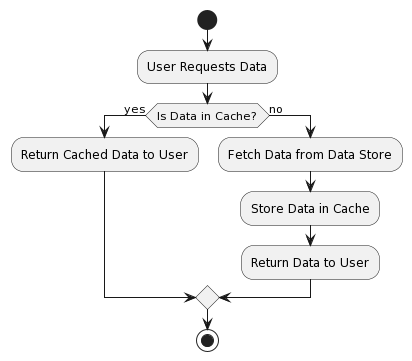
The following activity diagram recapitulates visually these steps :
Implementation
In this Node.js server example, we’re using Express.js to set up an endpoint that serves data. When a request comes in, the server checks if the data is in a simple cache object. If it’s a cache miss, the server fetches the data from an external API and updates the cache before serving the response.
const express = require('express');
const fetch = require('node-fetch');
const app = express();
const port = 3000;

// Simulate a cache with a JavaScript object
const cache = {};

// Middleware for lazy loading data
app.use('/data/:id', async (req, res, next) => {
  const { id } = req.params;

  // Check if the data is in the cache
  if (cache[id]) {
    return res.send(cache[id]);
  }

  // If not in cache, fetch the data and update the cache
  try {
    const response = await fetch(`https://api.external-source.com/data/${id}`);
    const data = await response.json();
    cache[id] = data; // Update the cache
    res.send(data);
  } catch (error) {
    res.status(500).send('Error fetching data');
  }
});

app.listen(port, () => {
  console.log(`Server running on port ${port}`);
});
Conclusion
Lazy loading is a design pattern that defers the loading of resources (on the cache) until they are needed. By understanding and leveraging this pattern, developers can create applications that respond quicker, and provide a better overall user experience.