
Serverless Front End Application on AWS
Introduction
Amazon S3 in combination with CloudFront is a powerful setup to serve a wide variety of web content.
-
Static Websites: Websites that don’t require server-side processing. They consist of HTML, CSS, and JavaScript files. Examples include blogs, portfolios, landing pages, and documentation sites.
-
Single Page Applications (SPAs): These are web apps or websites that interact with users by dynamically rewriting the current page, rather than loading entire new pages from the server. Think of frameworks like React, Vue, and Angular.
-
Web Assets for Dynamic Websites: While the dynamic part (like databases or server-side scripts) isn’t hosted on S3, you can host assets like images, videos, stylesheets, and JavaScript files, which can be served via CloudFront for faster delivery.
-
Media Hosting: Host images, videos, and audio files that can be embedded or linked to from other websites or apps.
Let’s consider the example of a company that wants to deploy its corporate website on AWS. S3 can be used to host the website and Cloudfront to distribute it globally.
Architecture
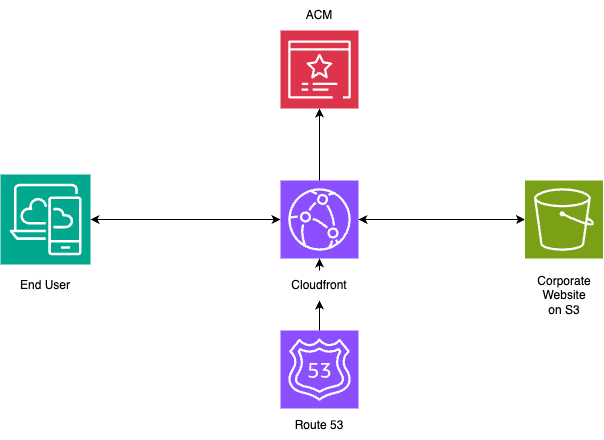
Components
Before we dwelve into the details of the flow, let’s view the building blocks of this architecture
S3
Amazon S3, or Simple Storage Service, is a storage service that is used to store large files. In this case it contains the build artifacts of the company website (html, css, js, images, …)
ACM
ACM, or AWS Certificate Manager, allows to manage/generate SSL/TLS certificates. These certificates ensure the data between the corporate website and its visitors remain encrypted and secure.
CloudFront
Amazon CloudFront is a Content Delivery Network (CDN). It serves the content of the S3 bucket globally. In this case it takes the site’s content and distributes it to a network of servers around the world. This ensures that users can load the website quickly around the globe.
Route 53
Amazon Route 53 is a scalable DNS service. In this case it helps resolve the company’s domain name to the cloudfront IP addresses.
Flow
Dns Resolution
The end user start by entering the website’s domain name (e.g., www.example.com) into the web browser. The browser queries Route 53 for the IP associated with www.example.com. Route 53 has a record set that points the domain to a CloudFront distribution.
Traffic handling with Cloudfront
CloudFront serves as the gateway for incoming traffic. It optimizes the delivery of web content by leveraging its global network of edge locations. When a user request lands on CloudFront, several things can happen:
- Cache Hit: If CloudFront has cached content that matches the user’s request, it returns the cached content directly, speeding up the response time.
- Cache Miss: If no cached content matches, CloudFront fetches the fresh content from the designated origin, which in this case is our S3 bucket.
Data Retrieval from S3
On a cache miss in CloudFront, the request is forwarded to the appropriate S3 bucket. S3 then retrieves the requested content and sends it back to CloudFront. CloudFront then caches this content (based on your caching rules) and serves it to the user. Future requests for this content can now be quickly served from CloudFront’s cache until the cache expires.
Conclusion
In this post, we’ve explored the architecture of hosting a front-end application using AWS services. At its core, S3 serves as the reliable storage for the application’s static assets. CloudFront, with its global network of edge locations, ensures efficient delivery of this content to users, backed by the security of ACM’s SSL/TLS certificates. Route 53 seamlessly integrates with CloudFront to provide domain resolution, making the entire system accessible via a user-friendly domain name. Together, these components form a robust, scalable, and cost-effective solution for serving front-end applications to a global audience.